TextPad
TextPad is mostly considered a text editor for Microsoft, but it is also used as an IDE. It was created by Helios Software Solutions and released in 1992.
TextPad was the first IDE I used for writing Java code in college. Some of the cons were that the program itself wasn't very intuitive and it wasn't very aesthetically pleasing.
Unlike most other IDEs, TextPad does not have any intuitive tools to assist with coding. It doesn't autofill and it doesn't make suggestions (although it does indent text automatically...).
As you can see from this screenshot, TextPad is not the prettiest IDE, although that's not necessarily a good reason to disregard this particular program, but when you're coding for hours every day, at least you can choose a prettier IDE to look at.
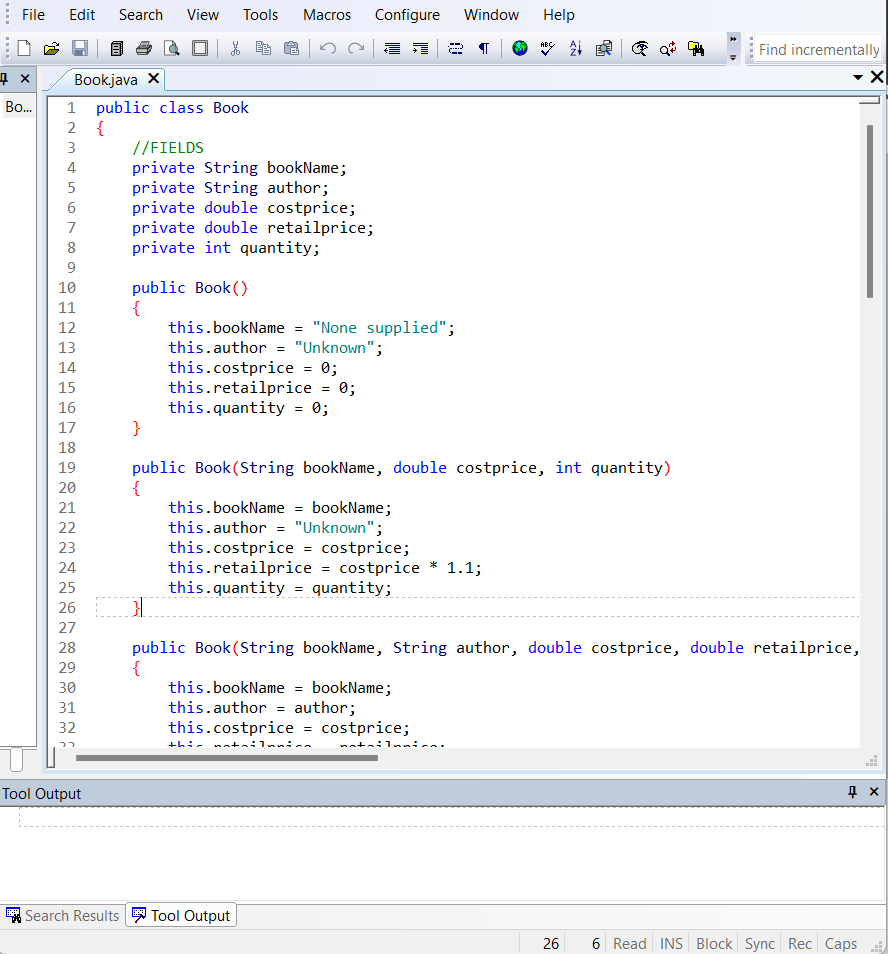
Unlike with Eclipse, all the constructors in my code had to be typed in manually, which is a waste of precious coding time. Errors can be quite vague too, leading to difficulty figuring out the problems with your code.
It is perhaps not a beginner-friendly program, but at the same time using it as a beginner can be beneficial since there is no help from the IDE. TextPad doesn't hold your hand, it never helps you complete your code, so it's up to you to really understand what you're doing.
In a time where we have ChatGPT and IDEs with IntelliSense, perhaps not having those tools helps us gain a deeper understanding of how to code, and that's the main reason I would suggest considering TextPad as your IDE of choice while you're still a novice.